
Context: what your AI sees
What it is
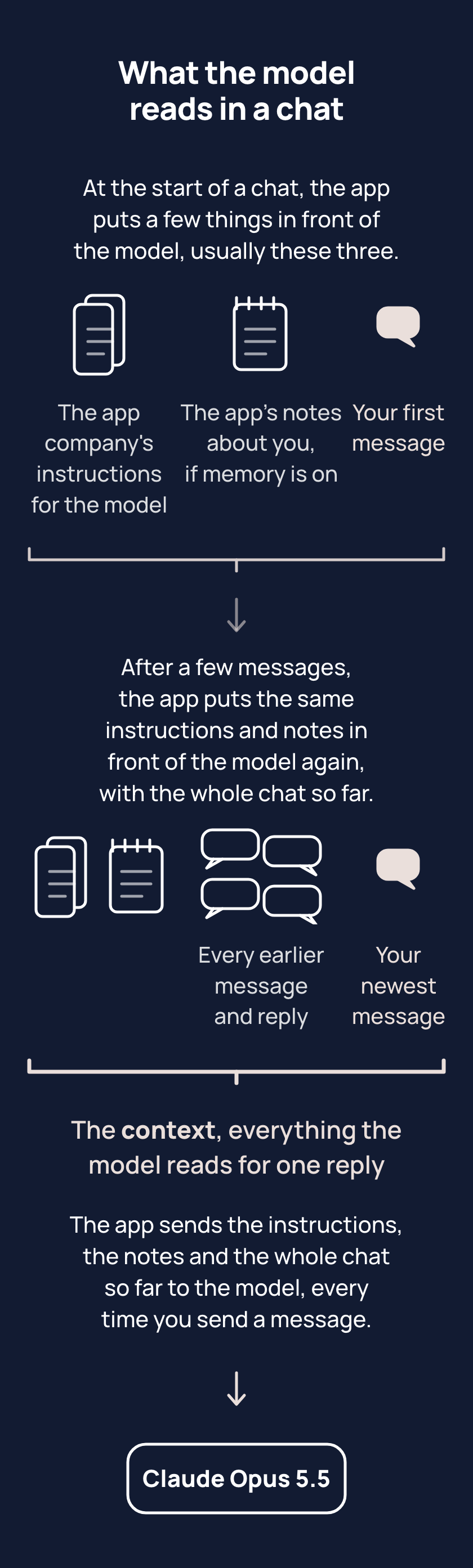
In a new chat, the model reads only what the app puts in front of it: a few things, usually these three. The first is the app maker's instructions on how the model should answer, such as being polite or refusing some requests; you did not write them and cannot change them.
The second is a few short notes the app saved about you, from what you say or when you ask the app to remember something. The notes are not the chat itself, so what you said yesterday is often not in the notes. Apps call these notes memory. Memory is switched on or off in the memory section of settings, where most apps let you read, change or delete the notes.
The third is your first message, the one thing you write. Instructions, notes and the whole chat so far are the context: everything the model reads for one reply. At the start, the chat so far is just your first message. The chat grows with every message after. Each time you send a message, the app hands the whole context to the model again. The model rereads the context each time and never remembers it. Tell one chat about a trip to Hobart, and a new chat knows nothing of the trip unless the notes kept a line about it.
Your other chats, and any files you gave them, are not in the context. Some apps have a setting that brings other chats or your files in. Some apps also let you write instructions of your own, and the app puts those in front of the model too. The memory section of your app's settings shows whether your app brings other chats or files in, and shows your own instructions if your app has them.
Tips
- Put what the task needs into the first message of a new chat, because the model reads only what the app puts in front of it and nothing from your other chats.
- When something seems forgotten, open the memory section of your app's settings before asking the chat, because the chat's answer is written by the model like any other reply, and the model does not look at the app's settings, so the answer can be wrong about what the app has saved.
Try it
- Open a new chat and ask: "what do you know about me, and where did each item come from?"
- Open the memory section of your app's settings and read the notes saved there.
- Compare the reply with the notes. Flip between the chat and the settings, or screenshot the notes.
Expect gaps between the two. The reply is written by the model, and the notes are what the app saved, so the notes, not the reply, are what carries into a new chat.
Risks
- In a temporary chat, one the app does not keep, or with memory off, the app hands the model no notes, not even one you asked the app to keep. Use an ordinary chat, and check memory is on in the memory section of settings.
- The model may say a note was saved when the app saved nothing. Look for the note in the memory section of your app's settings; if the note is not there, say in the chat what to remember, then look again.
- The app can save a changed note as a new one instead of replacing the old, so two notes sit in memory and the model reads both. In the memory section of your app's settings, delete the one that is out of date.
- In a chat you keep for one purpose, the app hands the model none of your other chats unless a setting brings them in. Start your next message in that chat with two lines: what you have done in other chats since, and what you want now.
Why it matters
"I told you this already" often means the words went to another chat, and the model reads only this one. You can put what the task needs in the first message, and check the memory section of your app's settings before asking the chat.