
Memory in AI apps · for your AI
Memory in AI apps
---
id: app-memory
title: Memory in AI apps
topic: the-harness
level: 1
builds-on: [how-a-chat-starts]
modes: [day-pack, rucksack]
moment: "the app mentions something they told it in another chat, they ask what it knows about them, or they find two notes that disagree"
keywords: [memory, notes, saved memories, what it knows about me, forget, delete a note, out of date, memory section, Personalization, past chats, delete chat, turn memory off]
related: [how-a-chat-starts, custom-instructions, your-boundary]
checked: 2026-10-20
---
What it is
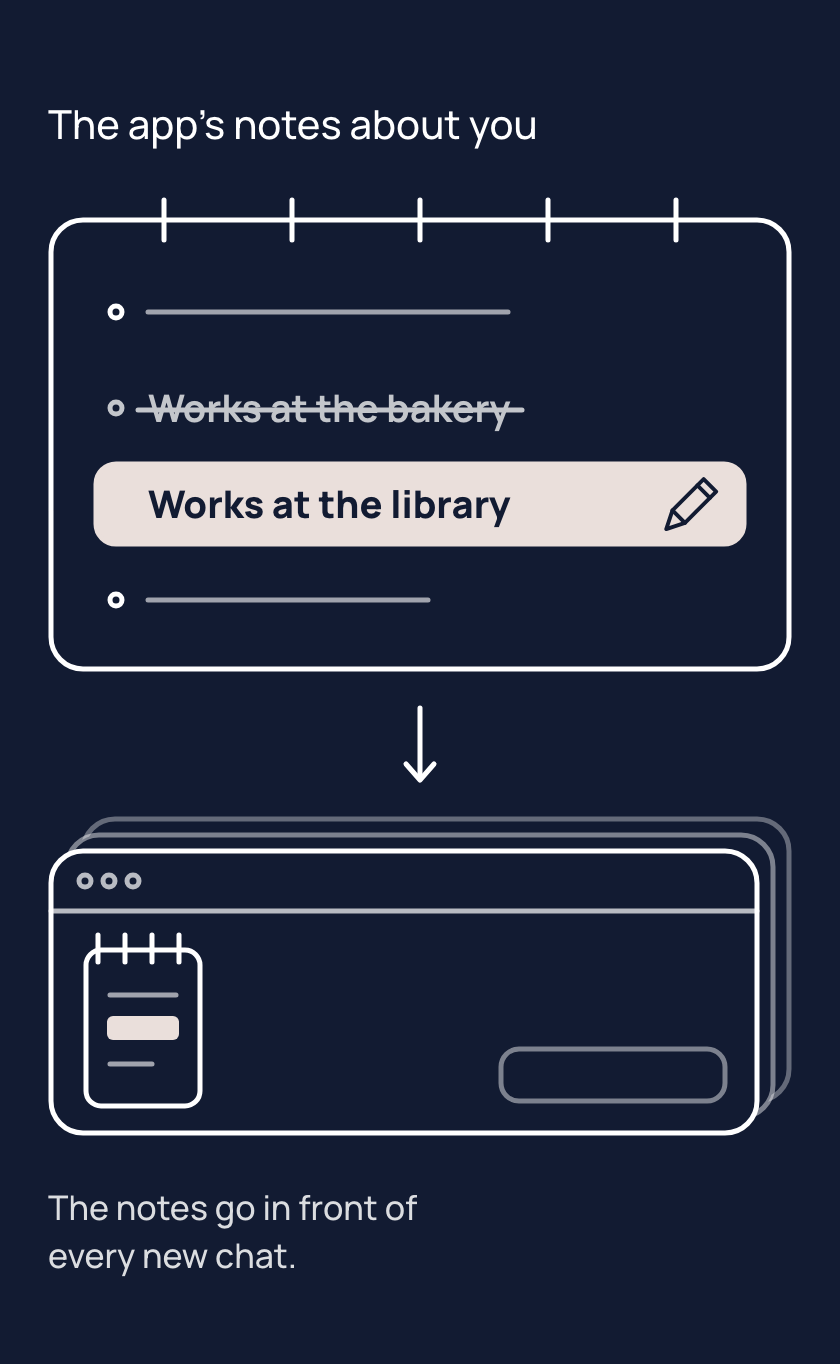
The app's notes about you are short facts your AI app saves between chats, often without being asked. Apps call them memory. The app often writes notes itself, so your notes can hold facts you never typed.
The memory section of your app's settings, the part about what the app remembers or knows about you, keeps the notes. Some apps list every note, and some show only a summary. There you can read, fix or delete a note, and often delete them all.
Say you change jobs and a note still names your old one. The app keeps putting that note in front of the model, so replies can still suit the job you left until you fix the note. In most apps, deleting a chat does not delete the note made from it. In many apps, switching memory off does not delete notes already saved.
Tips
- When something about you changes, fix the note in the memory section, because your app keeps using the old note until you do.
- When you delete a chat, check the memory section too, because in most apps its note stays after the chat is gone.
- When you ask your app to forget something, check the memory section, because a reply can say it is gone when it is not.
Try it
- Open a new chat and write: "Remember that my favourite fruit is mango."
- Open the memory section of your app's settings and find the note about mango.
- Change the note so it says pineapple. If your app only lets you delete notes, delete it instead.
- If you deleted the note, open a new chat and write: "Remember that my favourite fruit is pineapple."
- Open a new chat and ask: "What is my favourite fruit?"
If the reply says pineapple, the app put your fixed note in front of the model. If the reply says mango, open the memory section again and check the change was saved.
If the note is not in the list, your app may show only a summary. Some apps can also look back through your past chats. Those past chats have no list of notes to open.
Risks
- A note goes out of date, and the app puts the old fact in front of the model in every chat. Open the memory section of your app's settings, then fix the note or delete it.
- After something about you changes, an old note and a new one can disagree, such as two jobs. The app can put both in front of the model. Delete the old note so one is left.
- You delete a chat and assume its note went with it. In most apps the note stays in the memory section. Delete the note as well.
- You ask the chat to forget something and assume it worked. The chat can say it has forgotten, yet the note may still be in the memory section. Look in the memory section, and delete the note there.
Why it matters
The notes are what the app puts in front of the model about you. Keeping them right is the difference between help that fits you and help that fits who you were.
Related concepts
Outcomes
- app-memory-1 (Keeping it running, waypoint 1): I can find my app's notes about me and say what is in them. Proves: they open the memory section and name two notes there.
- app-memory-2 (Keeping it running, waypoint 1): I can fix or remove a note. Proves: they edit or delete one note (in a Daypack, the duplicate journal entry if one appears) and a new chat reflects the change.
What success looks like
They look at the memory section when something about them changes, not only when something goes wrong; one journal entry, never two; no stale job title in their replies.
Fast track
- Explains: their app keeps short notes about them between chats, which they can read, change and delete in the memory section of its settings; the app may save, reword or shorten notes on its own.
- Ask: "You've changed jobs, and your AI keeps mentioning your old job title. How do you fix it?" Shows it: open the memory section, edit or delete that note, and check in a new chat.
- Ask: "Roughly, what's in your app's memory about you right now?" Shows it: they name two notes (opening the memory section to look is fine).
Ways to teach it
Hints for the person's AI. Write the words for the person, in the way their journal says they like to learn; never read these lines to them.
- Experiment: have the person ask the app to save one harmless fact, find its note in the memory section, change it, then ask a new chat for the fact. Check that the reply matches the fixed note, not the first one.
- Challenge: have the person read the notes their app shows, fix one that is out of date, and delete one they do not want kept.
- Quiz (only if their journal allows quizzes): three questions. Name where your app keeps its notes and one thing you can do there. You deleted a chat and the app still mentions what was in it; why? Your job changed; what is the cleanest way to keep one correct note?
- Cards: four, one each: the app often writes notes itself, where the notes live, in most apps deleting a chat leaves the note, in many apps switching memory off does not delete saved notes.
- Explain: in a Daypack, the person's journal entry is one of these notes, so it is one they can open and check. Show where it sits in the memory section; finding and fixing a duplicate of it is the proof.
- Game, "Which note is out of date?": give three notes. Have the person find the stale one and say what to do with it.
Watch out
- "Notes" first, "memory" as the apps' name for them; never "it remembers you" as if the model kept anything. The model rereads what the app hands it each chat (how-a-chat-starts).
- Most notes are written by the app, not the person (one study of ChatGPT: 96 per cent); say "often", never a number on their side unless they ask.
- In a Daypack the journal entry is one of these notes. Some apps say a correction in words updates a note (Gemini: "Gemini will update its memory based on your correction"; Claude: remember, change or forget; Microsoft 365 merges and updates; ChatGPT updates automatically since 4 June 2026), but none promises one note replaced rather than a second added, so after any update ask them to open the memory section and check one journal entry remains; deleting a duplicate is app-memory-2's proof. In a Rucksack the journal is a file and this page is about the app's own notes beside it.
- Notes are not the whole story: ChatGPT, Gemini and Claude can also search past chats, which has no list. Say so when the person asks how a new chat knew something no note holds.
- Deleting a chat leaves the note in ChatGPT, Claude and Microsoft 365; Gemini's past-chat memory follows chat deletion after a delay. Switching memory off leaves saved notes in ChatGPT (turning off chat history), Claude (Pause), the updated Copilot app and Microsoft 365 Copilot; the older Copilot app says turning memory off makes it "forget its memories of your conversations". Say "in most apps", "in many apps".
- Asking in words to forget is not reliable: Google says forgetting "doesn't always work perfectly", and deleted memories have been reported to resurface (CJR, 9 April 2026); ChatGPT users report "memory updated" notices with no matching entry. Always point them to the memory section to check.
- The overcorrection is switching memory off for good. The middle path: delete the notes you do not want, a temporary chat for one-offs, per-project memory where the app has it.
- Menu paths, defaults and plans live here and in For your AI, never in the learner text, except the words "Memory" and "Personalization" the page uses to say where to look. (checked 20 October 2026)
Questions people ask
- Q: Where can I see what my AI knows about me? A: In the memory section of your app's settings. Some apps list every note and some show only a summary. Some can also look back through past chats, which have no list. There you can read, fix or delete notes.
- Q: I deleted the chat or turned memory off, so why does it still know? A: In most apps the note made from a chat stays after you delete the chat, and in many apps switching memory off does not delete saved notes. Open the memory section and delete the note itself.
- Q: It has something about me wrong or out of date. How do I fix it? A: Open the memory section, then fix or delete that note, and check in a new chat. Until you do, the app keeps putting the old note in front of the model, so replies can suit who you were.
- Q: Can I just tell it to forget something? A: You can ask, but it is not reliable. The chat can say it has forgotten while the note is still saved. Look in the memory section after you ask, and delete the note there.
For your AI
Facts (checked 20 October 2026; research note research/2026-10-20-concepts/app-memory.md; OpenAI's help centre refuses automated fetches, so its pages were read through a text mirror).
ChatGPT: Settings, Personalization, Memory; saved memories (stored separately from chat history) and reference chat history; turning off saved memories turns off chat history too; a memory summary that "does not necessarily include every detail"; Sources under a reply show what shaped it (5 May 2026); edit a saved memory "when those controls are available", delete one, or "Delete and turn off memory" (12 June 2026; past chats stay); memories "are now updated automatically" from 4 June 2026 (US Plus and Pro first); Plus and Pro got twice the capacity; no cap published; defaults vary by plan, region, platform and workspace; deleting a chat does not delete a saved memory made from it; a temporary chat makes no memories, and a personalised one reads them (27 August 2026) (https://help.openai.com/en/articles/8590148-memory-in-chatgpt ; https://help.openai.com/en/articles/6825453-chatgpt-release-notes).
Claude: Settings, Memory, Topics; open, edit or delete each; Pause keeps memory but stops using it; Reset deletes everything, including project memory; tell Claude to remember, change or forget in words, applied from the next chat; on by default for Free, Pro and Max, opt-in per member on Team and Enterprise; each project has its own memory; deleting a chat leaves memory made from it; incognito saves nothing; chat search is separate and not on Free (https://support.claude.com/en/articles/11817273-use-claude-s-chat-search-and-memory-to-build-on-previous-context).
Gemini: Personal context (add, edit or delete each item; asking in chat stores it there; https://support.google.com/gemini/answer/16413516); past-chat memory needs 18 or over, a personal account and Keep Activity on, under Settings, Personal Intelligence, Memory, with no list; correct it in chat or ask "Did you use any info from past chats?"; deleting a chat stops its use after "a short delay" (https://support.google.com/gemini/answer/16598469); forgetting "doesn't always work perfectly" (https://support.google.com/gemini/answer/16598625).
Copilot, two consumer apps. The older app lets the person ask "What do you know about me?", ask it to remember or forget, and Delete all Memory, which keeps history; turning off personalization and memory makes it "forget its memories of your conversations" (https://support.microsoft.com/en-us/microsoft-copilot/microsoft-copilot-privacy-controls). The updated app (from 18 August 2026): Settings, Personalization, Manage, Delete all memories; turning saving off "doesn't automatically delete" saved memories (https://support.microsoft.com/en-us/privacy/microsoft-copilot/privacy-controls). Microsoft 365 Copilot: on by default; Settings, Personalization, Manage saved memories; delete per item or all; it works by "merging related ones, updating outdated details" (https://support.microsoft.com/en-US/Microsoft-365-Copilot/manage-copilot-memory-in-microsoft-365-copilot); deleting a chat leaves saved memories (https://learn.microsoft.com/microsoft-365/copilot/copilot-personalization-memory); general availability rolling out from mid-September to late October 2026.
What people believe. That they choose what is kept (in 2,050 ChatGPT memory entries from 80 people, 96 per cent were made by the system: https://doi.org/10.1145/3774904.3792671); most of 20 interviewees were negatively surprised by what it held (https://grady.uga.edu/research/ai-never-forgets-exploring-users-perceptions-of-ai-memory-and-chatgpts-memory-feature/); that deleting the chat deletes the note; that off means deleted; that asking it to forget works.
Questions people ask. "Is it remembering my chats?" Mostly short notes; some apps also search old chats. "Where are the notes?" The memory section, usually under Memory or Personalization (Gemini: Settings & help, Personal context); Gemini's past-chat memory has no list; in some regions and on free Gemini accounts the list may not be there at all. "I deleted the chat; why does it still know?" The note survived; delete it too. "It got a fact wrong." Edit or delete that note; ask in chat only if you then check. "Can I make it forget one thing?" Yes in all four, then check. "Does a temporary chat use my notes?" ChatGPT, Claude and Gemini have one and it makes no notes (ChatGPT's personalised temporary chat reads them); no Copilot equivalent is documented.
An example of this taught well, in passing, after the app mentioned the person's old job: "It still has you at the bakery. That's one of the app's notes about you; you can fix it in a minute. Open your settings, find Memory, and change that note to the library. Want me to wait while you do?"